✦Free, on your Mac
Talk instead of typing. In any app.
Hold fn⌃, say it, let go. Glint types it where your cursor is, catches it when you change your mind, and learns the names you use. It runs on your Mac, works offline and costs nothing.
Monday
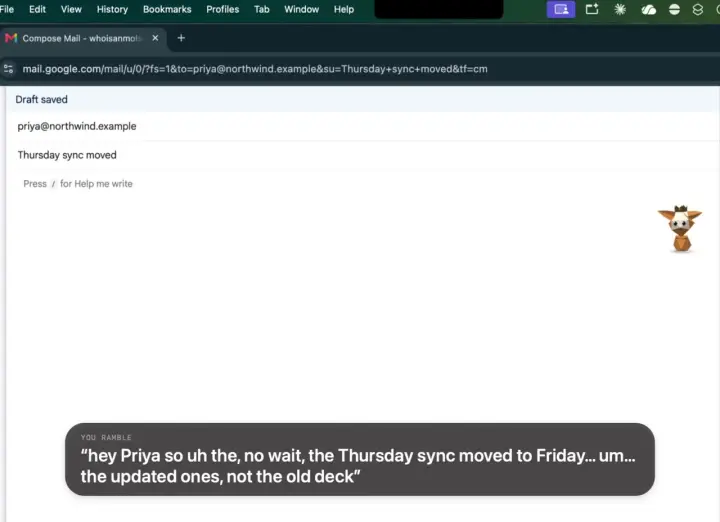
Press and hold the button (or tap it). This is a recording of what Glint does, not your microphone.
- 1Hold fn ⌃in any app, wherever you’d type.
- 2Just talklike you would to a person. Ums and restarts are fine.
- 3Let goand clean text appears at your cursor.
What makes it feel like magic
- It catches your corrections“Meet me at 3, oh no, actually 4” comes out as “Meet me at 4.” Also “wait”, “make that” and “or rather”.
- “Scratch that”Say it and the last sentence disappears. Keep talking.
- It learns your namesFix a name or a word once, and it’s spelled right from then on.
- Works offlineOn a plane, in a café with bad Wi-Fi. The model lives on your Mac.
- No word limitBecause it runs on your Mac, there’s nothing to meter. Free, with or without a plan.
- 25 languages on the MacEnglish and 24 other European languages. Others go to the cloud, with a plan.
Next to the dictation your Mac came with
Same Mac, same voice, the same sentences read out loud. Fewer words to fix means you actually use it.
Words wrong out of every hundred, in our own test on one speaker’s voice (November 2026). Your results will vary with your voice, mic and language.
| Glint | Apple’s built-in dictation | |
|---|---|---|
| Price | Free | Free |
| Works offline | Yes | On Apple silicon, for supported languages |
| Catches “3, oh no, actually 4” | Yes | No |
| Learns a name after one fix | Yes | No |
| Hands-free for long notes | Yes | Yes |
Questions
More on the support page.
Is it really free?
Yes. Dictation runs on your Mac, so it costs us nothing to run and you nothing to use. No plan, no word limit, no trial. Talking to Glint and helpers are the parts that need a plan.
Does my voice leave my Mac?
For English and 24 other European languages, your voice is turned into words on the Mac itself. With a plan, a longer passage also gets a quick tidy-up by a cloud model, as text; switch on On-device only in Settings and every word stays on the Mac.
Which Macs?
Apple silicon Macs (M1 and later) with macOS 14 or later. The speech model, about 470 MB, downloads by itself the first time, and it waits for Wi-Fi.
Which apps does it type into?
Any app with a text box: Mail, Gmail, Slack, Notes, Word, Google Docs, Messages, your code editor. It types where your cursor is.
Can I talk for a long time?
Yes. Tap fn ⌃ twice and keep talking hands-free; tap again when you are done, or press Esc to cancel.

Dictation is free. Start today.
Download Glint, and dictation is ready when the welcome tour ends. Talking to Glint and helpers come with a plan, whenever you want them.